
WhatsApp for admins and teachers
Admins and teachers can ask Labbaik questions and get things done from WhatsApp, without opening the app. Home has a Run your day from WhatsApp card with a Chat on WhatsApp button to get started.
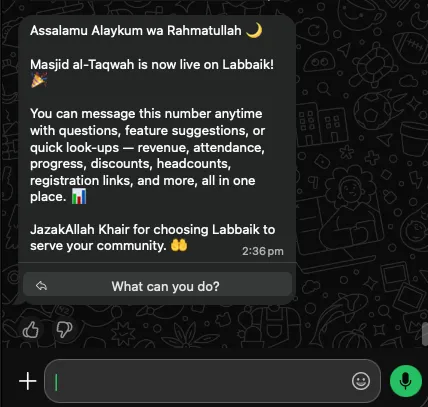
When your organisation goes live, you get a welcome message from Labbaik. Save the number, and tap What can you do? to see what you can ask.
Turn on WhatsApp for a staff member
Section titled “Turn on WhatsApp for a staff member”Staff need WhatsApp access before Labbaik will answer them.
-
Go to Education → Staff and open the staff member. They need to have a Labbaik login.
-
On their Permissions card, switch on Enable WhatsApp task alerts.
This gives them the WhatsApp assistant as well as task reminders. It uses the mobile number on their staff record. If the switch is greyed out, add a mobile number under Contact first. They must message Labbaik from that same number.
What admins can ask
Section titled “What admins can ask”| Ask about | For example |
|---|---|
| Attendance | “How was Class 3’s attendance this week?” · “Which registers haven’t been marked today?” |
| Students | “How is Aisha getting on?” · “What are Bilal’s exam results?” · “What’s Yusuf’s mum’s number?” |
| Fees | “Who hasn’t paid?” · “How much did we take in September?” · “Why was August lower than July?” |
| Links | “Send me the registration link for the Hifz class” · “Get me Ali’s payment link” · “What’s the donate link for the roof appeal?” |
| Staff and admin | Teacher earnings, recurring tasks, and your Labbaik plan |
What admins can do
Section titled “What admins can do”Labbaik can also make changes. It always shows you what it’s about to do first, and only goes ahead when you confirm.
- Approve pending registrations
- Apply a family discount or an admission waiver
- Log or void a cash or bank payment
- Set a class’s monthly fee
- Give a teacher a permission, or take it away
- Chase a Nikah applicant for payment by email
What teachers can ask
Section titled “What teachers can ask”Teachers get a narrower assistant, limited to their own classes:
- A register link: “Send me the register link” gives a link to today’s register for one of their classes.
- Application and donation links
- Medical notes for students they teach
- How-to help, such as where to log progress, or why they can’t see contact details
- Log cash or bank payments for their own students, if you’ve given them the Log cash and bank payments permission
Admins and teachers can also report their own child absent, just like a parent.
Task reminders
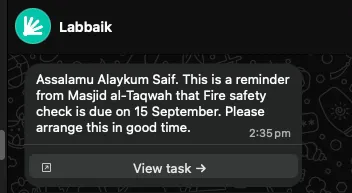
Section titled “Task reminders”When you add a recurring job under Mosque care (such as a fire check or boiler service), tick Notify via WhatsApp. The person responsible gets a reminder when it’s due, with a View task button. If it’s still not done, follow-up reminders come with a Mark done button. One tap records it and tells them when it’s next due.
If they haven’t got WhatsApp alerts yet, Labbaik asks whether to turn them on. Choose Yes, enable.
Voice notes, photos and support
Section titled “Voice notes, photos and support”- Voice notes: send one with no caption, and Labbaik listens and answers as if you’d typed it.
- Asking for a person: say you’d like to speak to someone, or ask for a demo or a new feature. Labbaik opens a support case with a number like LB-0123, and our team gets back to you. Ask “Is LB-0123 still open?” or “List my tickets” at any time.
- Photos or documents sent without a caption also open a support case, so our team can take a look.