
Set up a prayer board screen
The prayer board is a full-screen display for a TV or monitor. It shows today’s times, a countdown to the next jamaah, and announcements you’ve posted to the board.
What you need
Section titled “What you need”- A TV or monitor
- Anything that can open a web page full screen: a smart TV’s browser, a Fire TV Stick, a Chromecast with Google TV, or a small PC
- Your prayer times added in Labbaik
Set it up
Section titled “Set it up”-
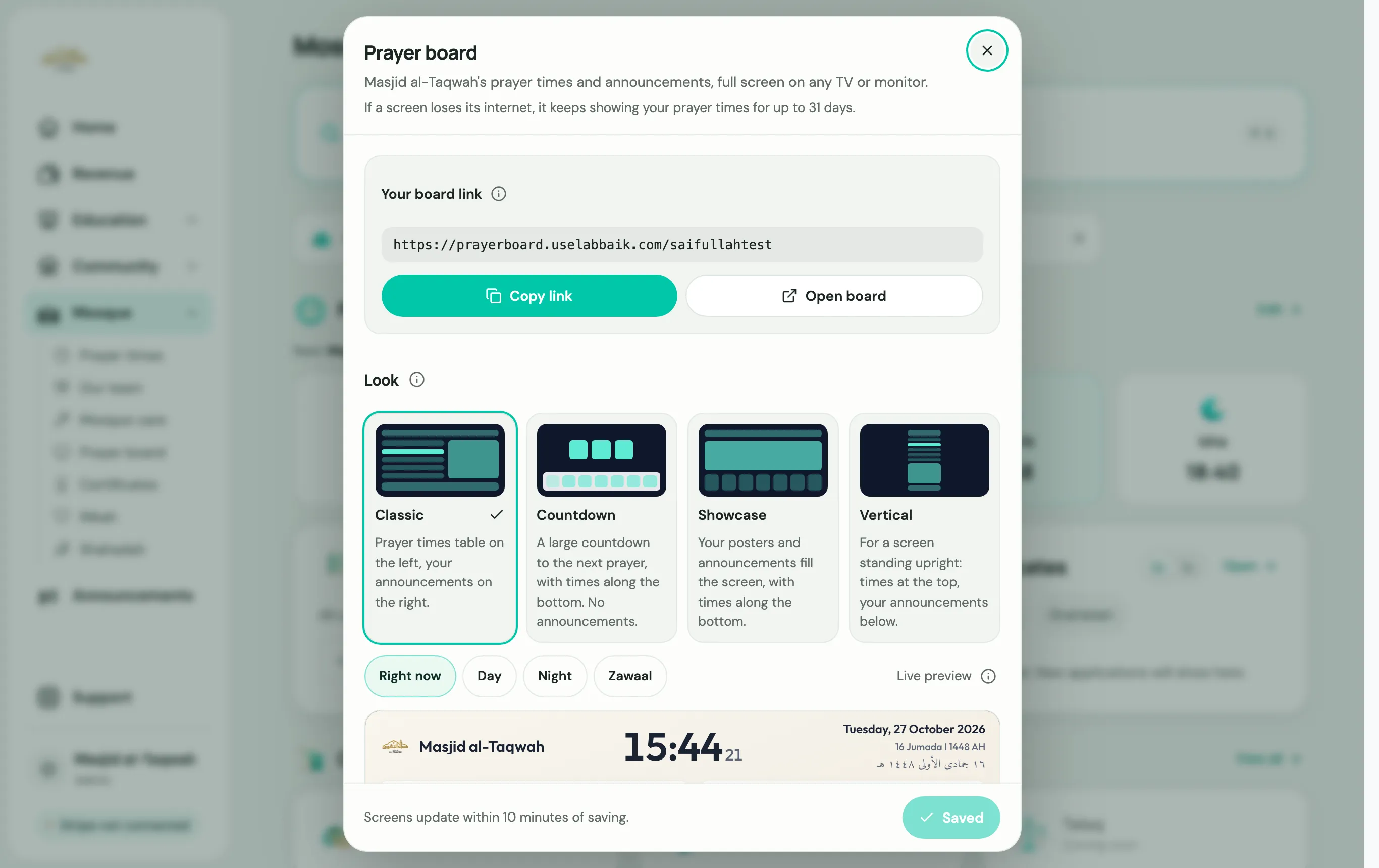
Go to Mosque → Prayer board.
-
Under Look, pick a layout:
- Classic: a prayer times table on the left, with your announcements on the right.
- Countdown: a large countdown to the next prayer, with times along the bottom.
- Showcase: your posters and announcements fill the screen, with times along the bottom.
- Vertical: for a screen standing upright, with times at the top and announcements below.
Use Live preview, switching between Right now, Day, Night and Zawaal, to see how it will look at different times.
-
Save your choice.
-
Under Your board link, choose Copy link. The link looks like
prayerboard.uselabbaik.com/yourname. -
On the TV’s browser, open that link and make it full screen.
Choose Open board to see it on your own screen first.
Put announcements on the board
Section titled “Put announcements on the board”When you post an announcement, set Show on to Prayer board or Both.