
The teacher portal
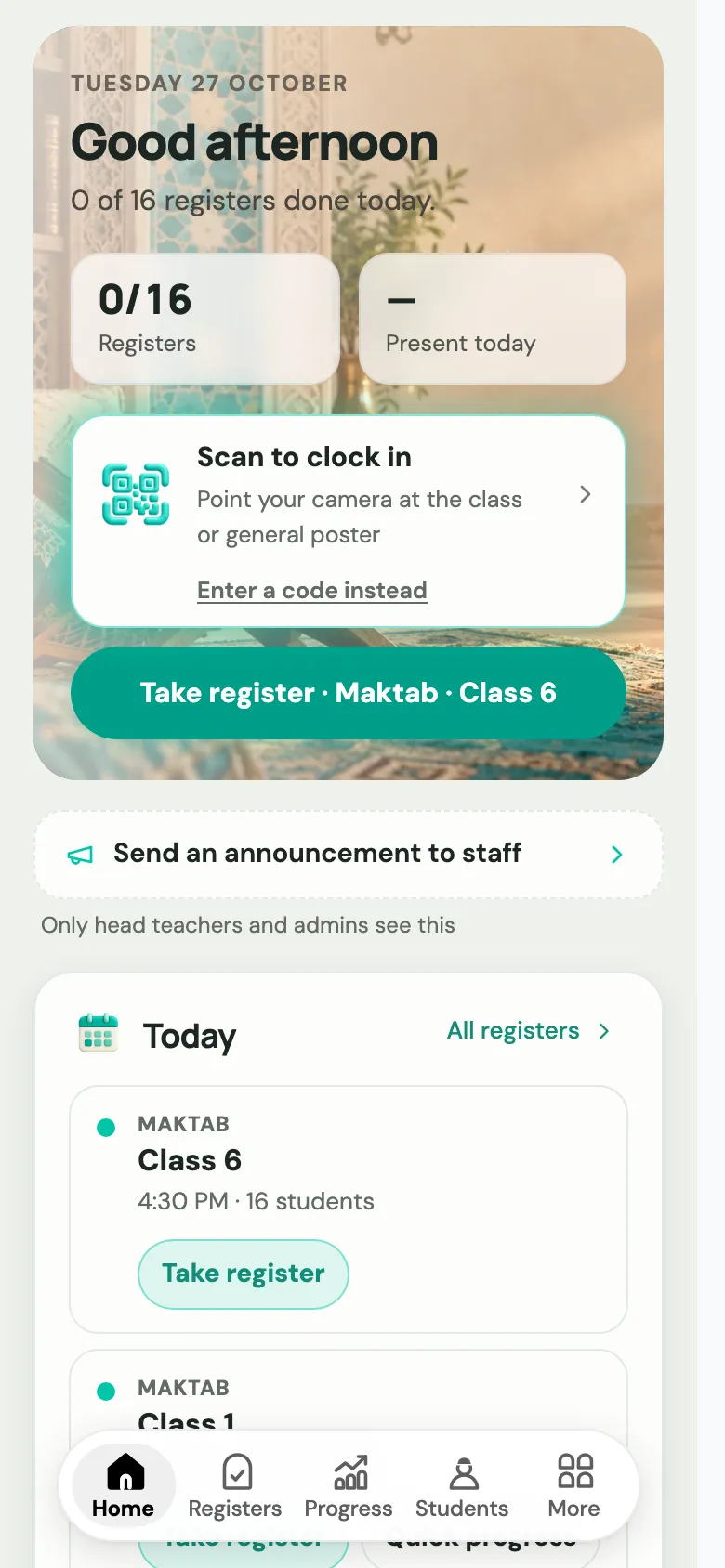
Teachers use Labbaik at app.uselabbaik.com/teacher. It’s built for a phone, so a teacher can take the register and log progress during the lesson. On a computer it shows a sidebar instead of the bar along the bottom.
Put it on the home screen
Section titled “Put it on the home screen”-
Open app.uselabbaik.com/teacher and sign in with the email you were invited with.
-
iPhone: in Safari, tap the Share button, then Add to Home Screen. Android: in Chrome, tap the ⋮ menu, then Install app or Add to Home screen.
-
Open Labbaik from the new icon and allow notifications when asked.
Home is the teacher’s day at a glance:
- Take register · [class]: the next register due, one tap away.
- Today: each class today, with Take register (or Done once it’s taken). Classes with Qa’idah, Qur’an or duas also have Quick progress, and Hifz classes have Log Hifz.
- Your day: Scan to clock in with the staff QR code, if your organisation uses it for pay.
- Messages: replies from the office and your own time off. See Staff messages.
- Absence reports from parents, Set homework, recordings waiting to publish, and a summary of last month.
The tabs
Section titled “The tabs”On a phone, the bar along the bottom has Home, Registers, Progress, Students and More.
| Tab | What it’s for |
|---|---|
| Registers | Today’s register, and a month calendar to catch up any day that was missed. See Take a register. |
| Progress | Who needs an update this month, and where to log Qa’idah, Qur’an and Hifz progress. See Log progress. |
| Students | Search your students, filter by class, and open a student’s details. Add student only appears if you’ve been given that permission. |
Under More:
| Tool | What it’s for |
|---|---|
| Homework | Set homework, including Qur’an passages, voice notes and photos, then mark it. See Homework. |
| Qur’an | The Qur’an Companion: read and listen to any passage, ayah by ayah. |
| Syllabus | What you plan to teach through the year. |
| Reports | Write and publish term reports for your students. |
| Exams | Set, send and mark exams. |
| Salah & dhikr | Shows when one of your classes tracks daily salah and dhikr. |
| Daily log and Safeguarding | Your teaching journal, and where to report a concern about a child. |
| Messages | Private messages with the office. |
| Log payments / Fees | Only for teachers with the fees permissions. |
More also has Academic year (term dates and closures), App & notifications, Take the tour, and Parent portal for teachers who are also parents.
Some tools only appear when your organisation has switched them on.